TapRound: A Free NFC Reader and Writer for UK Site Teams
'%20fill='%230A2841'%3e%3cg%20id='Group-23'%20transform='translate(1030,%20300)'%3e%3cg%20id='Group-22'%20transform='translate(0,%2015)'%3e%3crect%20id='Rectangle-Copy-6'%20fill-opacity='0.08'%20x='0'%20y='0'%20width='36'%20height='36'%20rx='15'%3e%3c/rect%3e%3cg%20id='Group-3-Copy-10'%20transform='translate(14,%2011)'%3e%3cpath%20d='M1.48030663,7.00622181%20L0,7.00622181%20L0,4.54113581%20L1.47413869,4.54113581%20C1.47413869,4.01634435%201.4507005,3.52367128%201.48092343,3.03386591%20C1.50559521,2.63812154%201.54383646,2.23147985%201.66472817,1.85466237%20C2.01506741,0.761490221%202.84959027,0.135181726%204.05048903,0.0382530307%20C5.00096925,-0.0380281321%205.96501894,0.0233409237%206.94078773,0.0233409237%20L6.94078773,2.40813096%20C6.43008195,2.40813096%205.92986166,2.40755742%205.42964138,2.40813096%20C4.82209886,2.40927805%204.61238876,2.60428252%204.60868799,3.1778251%20C4.60622081,3.6183058%204.6080712,4.0587865%204.6080712,4.53540038%20L7,4.53540038%20C6.90686404,5.37449317%206.81804564,6.17515861%206.72676007,7.00105992%20L4.61979029,7.00105992%20L4.61979029,14%20L1.48030663,14%20L1.48030663,7.00622181%20Z'%20id='Fill-1'%3e%3c/path%3e%3c/g%3e%3c/g%3e%3c/g%3e%3c/g%3e%3c/g%3e%3c/svg%3e)


At the end of a site round, a facilities manager needs a clear record of the checkpoints visited. For the security officer, cleaner or maintenance engineer carrying out that round, recording each visit needs to be straightforward.
Paper logs can mean extra admin after the work is finished. Updates sent through separate messages can leave supervisors searching for the information they need.
TapRound by Arez is designed to make that process simpler. A free, standalone NFC reader and writer, it gives site teams a way to scan tags, build a record of their round and email the results.
What is TapRound?
TapRound is built around two modes: Read and Write.
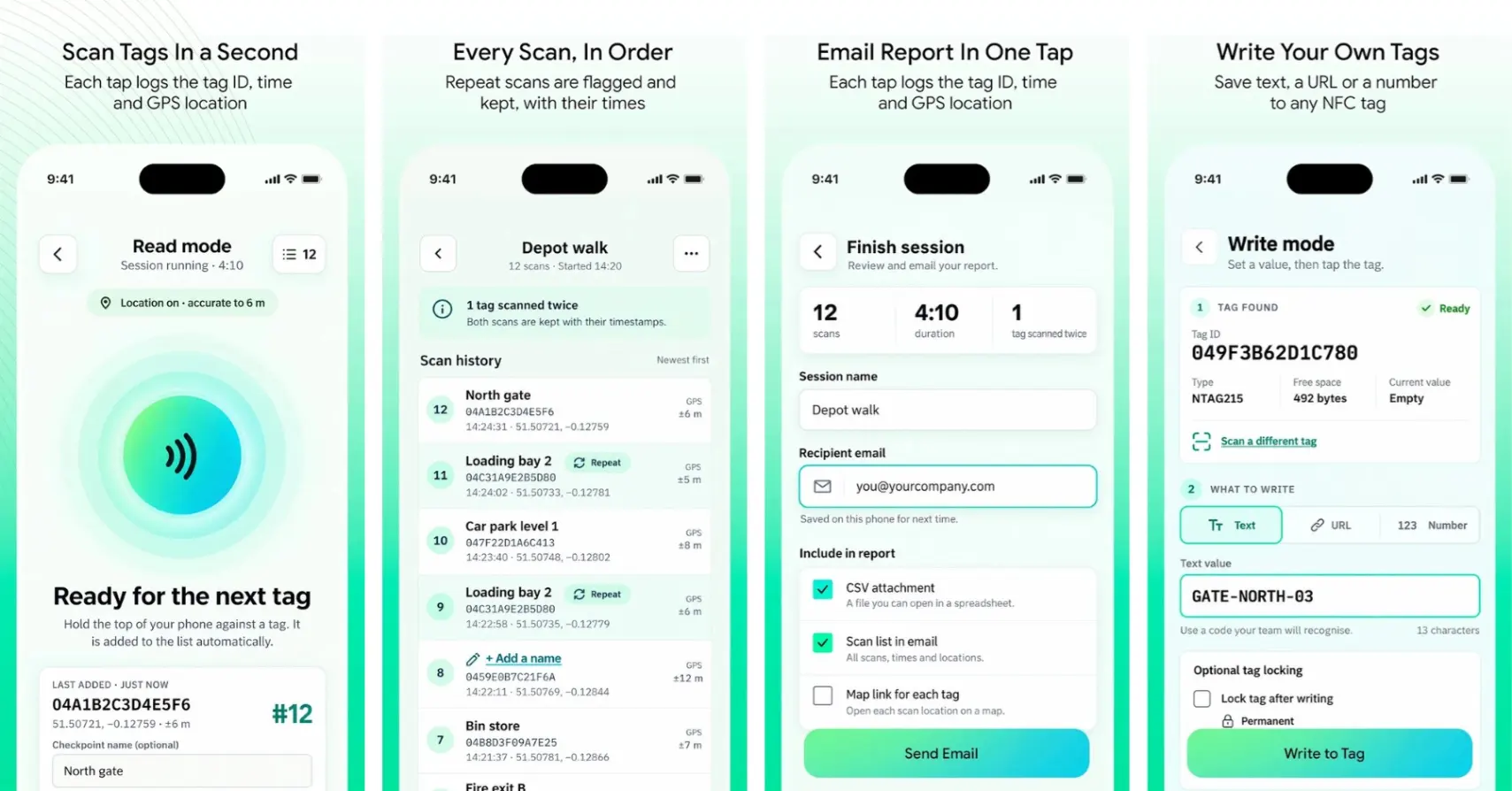
In Read mode, users scan NFC tags to create a session list. Each scan is designed to record the tag ID, time and phone location, subject to permissions and location availability.
In Write mode, users can enter text, a URL or a number to store on a compatible writable tag.
The app is intended to work without an account or an Arez subscription. This makes it a practical starting point for UK businesses that want to use NFC tags without first introducing a wider facilities management system.
A simpler way to record site rounds
NFC stands for Near Field Communication. A compatible phone can read a nearby NFC tag when brought close to it.
On a commercial property, tags could mark checkpoints at reception, a loading bay or a plant room. A worker scans each tag while following the agreed route.
TapRound’s Read workflow is designed to keep those scans in order. Repeat scans remain visible and are flagged, helping the supervisor understand the sequence.
When the round is finished, the user reviews the list, names the session and enters an email address to share the report.
The result is a record that can support the conversation between the site team and the office.
Where UK facilities teams could use TapRound
Security patrols
A security contractor covering an office building or industrial estate could use NFC tags at agreed patrol checkpoints.
Officers scan the tags during their rounds, creating a record for the supervisor to review. The team’s patrol instructions still define what the officer must check at each location.
Cleaning rounds
Cleaning teams could place checkpoints near washrooms, communal areas or building entrances.
A scan list can help a supervisor review visits to those locations and follow up on service queries. Consistent checkpoint names make the reports easier to understand, particularly when one manager oversees several properties.
Maintenance visits
For maintenance engineers moving between equipment locations, NFC tags could provide a simple record of visits to designated areas.
That record can sit alongside planned preventive maintenance (PPM) documentation or a work order. A checkpoint scan records the interaction with the tag; the maintenance documentation records the inspection findings and work completed.
Write useful information to NFC tags
TapRound’s Write mode is designed for setting up tags as well as reading them.
Users can add a checkpoint reference, a short text value or a URL to a compatible writable tag. The proposed workflow displays the chip type, available space and existing content before writing.
Afterwards, the app reads the tag back to check that the stored value matches.
Teams should test their chosen phones and tags before introducing them across a site. NFC support, tag compatibility and whether a tag is locked all affect what can be read or written.
Share a report with the office
TapRound’s report design includes a summary, map, full scan list and CSV file.
For a facilities manager overseeing several sites, this provides a way to review a session without asking the worker to type the checkpoint details into another document.
The brief also specifies keeping records on the phone until they are sent, with reports queued when a connection is unavailable. This is relevant to rounds through basements, service corridors and other areas where mobile reception can be unreliable.
Start with one site round
A useful first step is to choose one route and agree what each checkpoint represents.
Give the checkpoints clear names, test the tags and decide who should receive the report. Then review whether the information helps the supervisor answer everyday questions about the round.
For businesses that later need more structured patrol management, the brief specifies a CSV format intended for patrol import into Arez Operate.
Get started with TapRound
From security patrols to cleaning rounds, TapRound is designed to help UK site teams create a clearer record with less manual admin.
Looking for broader facilities and workforce management? Explore Arez.